An urge is not a decision.
Anker is your recovery companion for addictions of every kind: in your browser and as a web app, for calm everyday life and for the moments when it gets hard.
- Free
- In your browser and as a web app
- No ads, no third-party tracking


For calm days and for difficult moments
Anker helps you look early, stay able to act in the moment, and understand afterwards what happened.
Look early
A quick check-in asks how you are and how far the door to addiction is open right now. That way you notice changes before they grow.
Bridge the moment
The SOS flow guides you through acute craving: first change the situation, then, in five short steps, notice what is happening, make sense of it and decide what to do.
Understand patterns
Journal and Insights show when craving occurs and what has helped so far. They only describe, without judging and without predicting.
How does it feel right now?
In the journal and in routines you note your mood with a slider: five levels from very unpleasant to very pleasant, and colour and shape show how it feels. You can add fitting feelings from a word list. Both are voluntary.
Just to try: nothing is saved here.
Drag the slider or tap it.
SOS: when it is hard right now
First the obvious: stand up, leave the room, put your phone away, splash cold water on your face. Then Anker guides you through the moment in five short steps, from craving on a scale of 1 to 10 to a concrete action.
Much of it can be skipped. At the end one question stays: what will you do now? After about 20 minutes Anker asks on Today how strong the craving is now.
Everything about SOS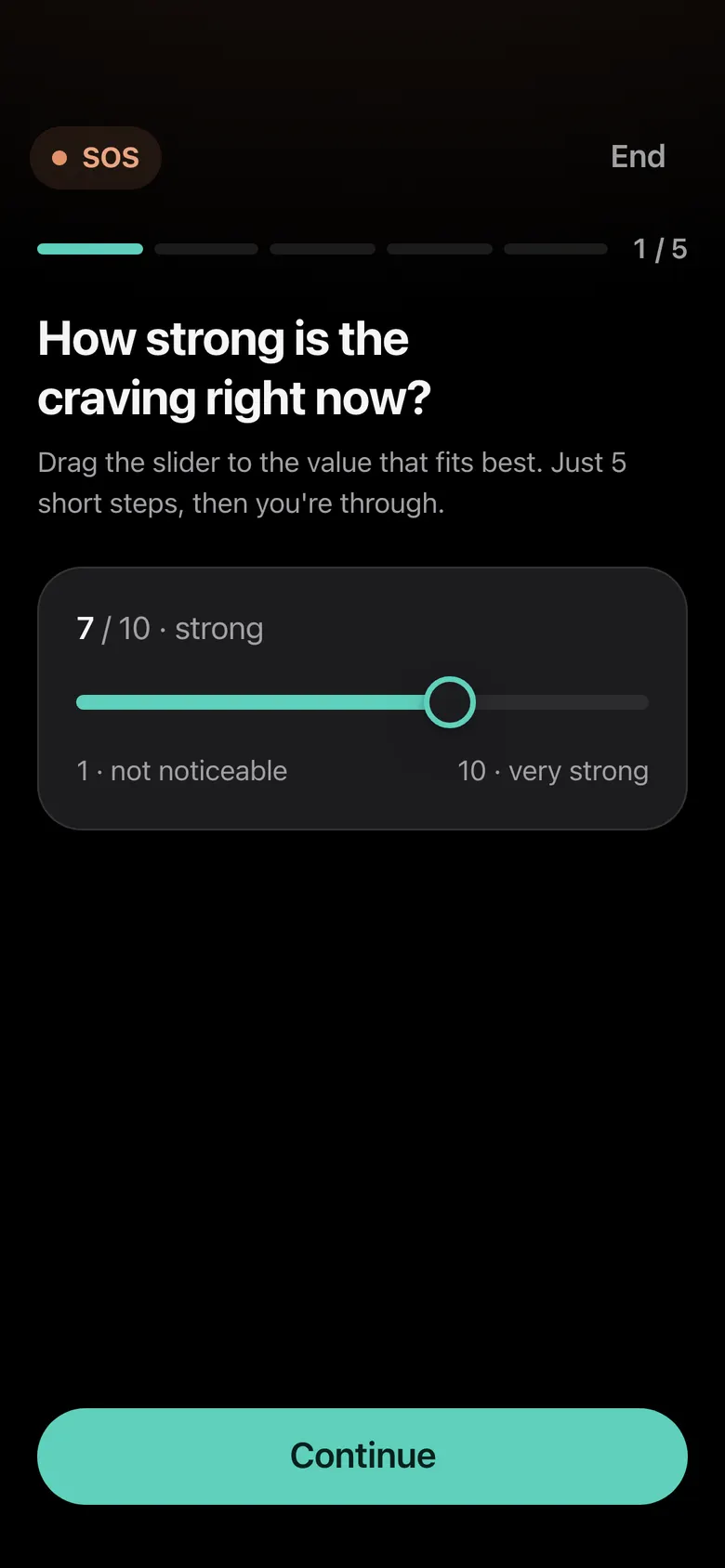
Rate the craving
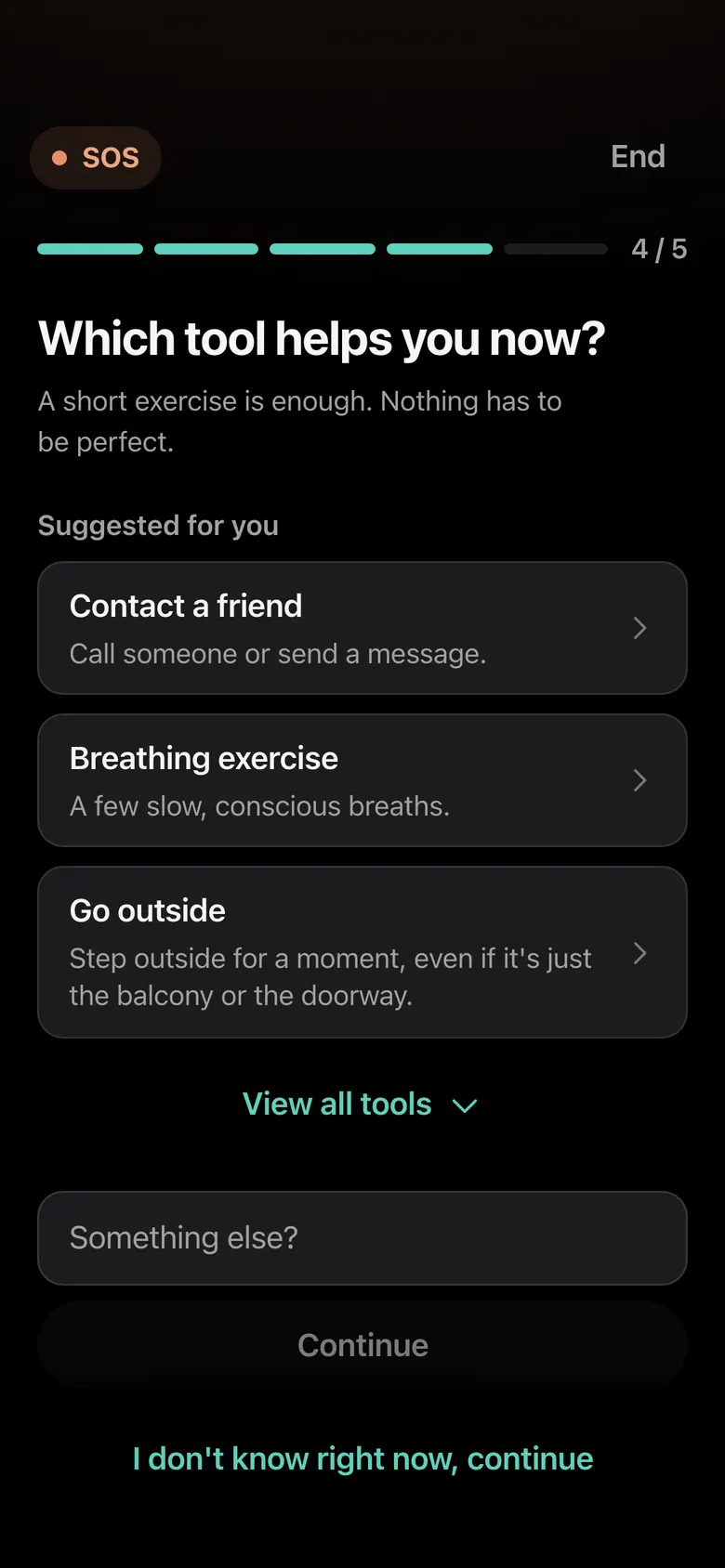
Choose a tool
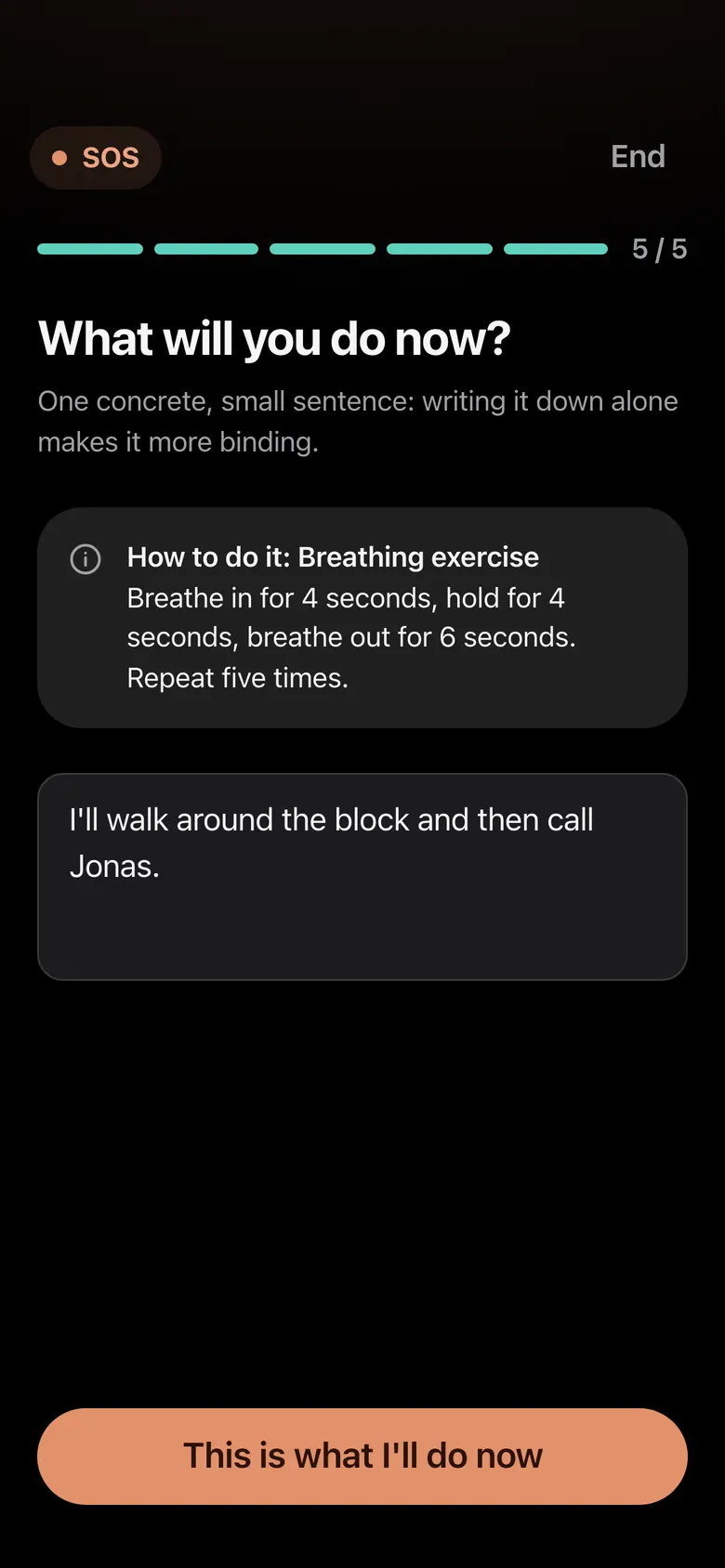
Decide on an action


Your limits, in your words
In the traffic-light system you note what gives you stability (green), which situations are risky (yellow) and which behaviour you want to avoid (red). Those are your bottom lines.
For each bottom line you can write a plan in eight questions: what comes before it, what do you need, what will you do instead? You decide what goes there.
More about the traffic-light system and bottom lines

Understand, without being judged
Insights show what your entries so far add up to: a calendar, craving before and after SOS, times of day and weekdays.
Milestones count what you have done, and none of it is lost. Everything is descriptive: no prediction, no judgement.
More about InsightsHow to start
You need a browser and an email address. Getting settled takes about three minutes.
Create an account
An email address and a password (at least ten characters, with upper- and lowercase letters, a number and a special character). A first name is optional. You do not have to wait for the confirmation link by email; the app is usable right away.
Settle in
Six short steps with questions about your topic, your goal, a first bottom line, a risk situation and a first tool. All of it is optional, only the consent at the end is required.
Use Today
On Today you do the quick check-in. SOS and Journal are always one tap away.
Anker runs right in your browser and as a web app. You can put it on your home screen like an app. How to install Anker
What you can know about Anker for sure
Anker handles sensitive entries. That is why this lists only what we can confirm, and also what Anker is not.
True today
- No advertising and no third-party trackers. The app's internal usage statistics are aggregated and pseudonymous; the website's need no identifier at all.
- No AI: your entries do not go to AI services and are not used for training.
- Hosted by Hetzner in Germany, encrypted in transit (HTTPS).
- You can download your entries as a file and delete your account with all its content.
- Optional PIN lock as protection against prying eyes.
What Anker is not
- Not therapy, medical treatment, addiction counselling or crisis support.
- Not end-to-end encrypted: the operator does not read any data but would theoretically have access to it.
- No promise of cure. Anker accompanies; it replaces nothing.
Why Anker exists
“I face the same challenges as the people Anker is made for. The app grew out of years of inner work and many notes of my own.
“Anker helped me a great deal in my recovery. I cannot promise it will help you. But I built it the way I would have needed it myself: calm, discreet and without judgement.”
The developer of Anker
More about AnkerFrequently asked questions
Does Anker cost anything?
No. Anker is completely free at the moment, with no trial, no subscription and no hidden costs. If Anker has helped you and you would like to, you can voluntarily support its running and further development.
Do I have to download Anker from an app store?
No. Anker is a web app: you open it in your browser and can add it to your home screen. Then it starts like an app. There is no need to download anything from an app store.
Who can see my entries?
Within your account, only you can see them. Anker is not end-to-end encrypted: the operator does not read any data but would theoretically have access to it. The privacy policy says the same.
Does Anker replace therapy or counselling?
No. Anker does not replace therapy, medical treatment, addiction counselling or crisis support, and it makes no promises of cure. It can be a supplement in everyday life.
If you feel you are in danger, call your local emergency number (112 in the EU). In Germany the Telefonseelsorge is free and open around the clock: 0800 111 0 111. The app lists further contacts under Me → Help & crisis.
Can I take my data with me?
Yes. Under Me → Privacy & data you can download your entries and settings as a file (JSON).
Start small. One check-in is enough.
Anker is free and runs in your browser and as a web app. There are no ads, no third-party tracking and no pressure.
If Anker has helped you and you would like to, you can voluntarily support its running and further development. Support Anker